

Shopping season special: Philips HN110 Noise Cancelling Foldable Headphones now less than $ 29!
Philips HN 110
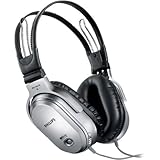
The ear cushions are specifically designed to prevent audio leakage and enhance bass performance too.
The construction material used is Neodymium, which offers a strong magnetic field for crisp sensitivity in a voice coil, enhanced bass response and high overall sound quality.
With acoustically tuned design, this full-size headphone covers your whole ear, and even folds up for compact storage in the soft pouch supplied.
Philips HN 110
Shopping season special: Amazon Kindle 6″ really rocks
It’s been around for a while and it’s well known but, you know, the newest Kindle

Amazon recently started exporting the Kindle to other countries, so you can buy one and use it wherever you are!
Amazon struggled to negotiate deals with European carriers, which was one reason why the Kindle was not already available to the European market, so instead, the Kindle roams from the AT&T network.
The features are fairly similar to those available to American customers. One can subscribe to and download newspapers, magazines and buy and and download books.
Several features set it apart from the others:
1. Amazon’s 130,000+ Kindle-format books are priced around $9.99 (some higher or lower).
2. Built-in wireless (called Whispernet) downloading is also free with purchase of the Kindle.
3. Form factor: the unit is shaped something like a book and is tapered on one side to make it easy to hold. The machine does make it very easy to read for long periods of time without the fatigue you get in your hand from holding a book open and up while reading.
The two major upsides to eBooks are presently: generally lower cost and ease of transportation.
Book addicts like us can literally carry hundreds of books in a unit the size of a typical small paperback.
Another benefit that may not be obvious at first is privacy.
How many times have you found yourself in a waiting room, an airplane, or other public places and wished those around you could not see what you were reading?
The 9.7” e-ink screen (no backlit or LCD) provides a pleasant reading experience. At first, we were afraid that some documents wouldn’t be as readable due to the fixed format of PDF.
But thus far, the Kindle DX seems to solve this very elegantly.
Getting a PDF documents on the device is as easy as you’ve come to expect. Just hook it up on your PC using USB, copy the files and you’re good to go.
The amount of storage is amazing. you can practically put your entire library on there without running out of space.
It also has a very long battery life. We’ve been using it for about two weeks now and so far did not have to recharge the battery.
If you want a 2001 H.A.L. relationship with your Kindle
With the experimental Text-to-Speech feature, Kindle can read English newspapers, magazines, blogs, and books out loud to you, unless the book’s rights holder made the feature unavailable. You can switch back and forth between reading and listening, and your spot is automatically saved. Pages automatically turn while the content is being read, so you can listen hands-free. You can choose from both male and female voices which can be sped up or slowed down to suit your preference. In the middle of a great book or article but have to jump in the car? Simply turn on Text-to-Speech and listen on the go.
The Amazon Kindle
A Blu-ray Disc Player with Youtube and Netflix plus USB? LG BD 390 is the answer – now 25% off!
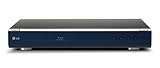

is the only Blu-ray player that will allow you to get rid of your “old” DVD/DivX players, and send them to desired retirement. What’s more, this player will allow you to watch HD movies in compressed (among others MKV) format.
Audio outputs on the rear of the LG BD 390
Analog audio aficionados may appreciate the BD390’s outputs for 7.1-channel surround sound, although 5.1 and 2.1 configurations can also be selected in the player’s audio setup menu.
The LG BD 390
The LG BD 390
Equipped with 1GB of internal flash storage, the BD390 doesn’t require any user-added memory to access the BD-Live streaming multimedia features that are increasingly being included in newer Blu-ray titles. I look forward to the day that this memory is standard on all players—not just on premium models.
The BD390 is one of the fastest Blu-ray player ever tested.
Over HDMI, the BD390 can output 1080p60, or 1080p resolution at 60 frames per second (fps) and 1080p24 video to a compatible TV.
Just like Knight Rider! Start your car (and more) from your iPhone or iPod touch
Control the Viper SmartStart remote car-starting system under your hood from the easy-to-use, touch-screen interface right on your iPhone.
BestBuy has an exclusive on the new Viper SmartStart System, which can do a number of things for your wheels:
There are two versions available: a module (SmartStart VSM100 Module, US$299.99) for cars that are already equipped with compatible Viper starting systems, and a fully loaded package (SmartStart VSM4000 System, US$499.99) for the rest of us.
Double the power with 3GJUICE Black 2.0 1800 mAh/2A DeLuxe Version: iPhone and iPod Battery Charger with OFF button for fresh energy with full 3GS support.
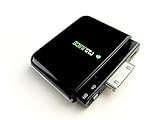

The new version charges your iPhone 3G from 10% to 100% in max 2,5 hrs while you’re on the road. It’s still compact in size and can attach directly to your iPhone without the use of cables. 3GJUICE Deluxe
There is no need to remove an iPhone case if it has an opening for the 30 pins connector.
The 3GJUICE Deluxe
With intelligent circuit (IC) and printed circuit board to avoid any damage to your iPhone 3G. The IC can handle 2A, most other models only 1A. This enables us to give you a very stable output and excellent battery efficiency. In lab tests, we made 85% efficiency, but hey, it’s only real life that counts. During tests in planes, cars, automobiles and public transport we achieved still 88% efficiency during hot and cold weather.
3GJUICE Deluxe
- top battery, stronger then any other cable less battery. 3GJUICE charges your iPhone from 10% to 100% in just 2.5 hours
- Use the 3GJUICE when the battery icon is in red. You can either continue to use the phone or wait 2.5 hours to have your iPhone totally charged
- Extra bonus: you can also charge all kinds of other Apple-players with the 3GJUICE: it charges all iPods of the third generation or higher
- Easily slips into glove compartment or pocket. Ideal as emergency battery because it’s a lion polymer and doesn’t suffer from memory effect
- With interesting backstory. The product is conceived by an irritated iPhone user who hated the battery life of his iPhone 3G.
3GJUICE Deluxe
Panasonic GF1: a serious competitor for Olympus E-P1 micro four-thirds compact camera
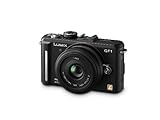

The Panasonic Lumix DMC-GF1
The Panasonic Lumix DMC-GF1
New for the LUMIX G Series, the Panasonic Lumix DMC-GF1
The Panasonic Lumix DMC-GF1
Save $120 and get a Sony Alpha A330Y DSLR w/18-55 and 55-200 lenses kit!
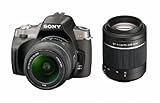

Replacing the A300 model, the Sony Alpha A330
Sitting in the middle of the Sony Alpha range above the entry-level A230 and and below the 14 megapixel A380, the Sony Alpha A330
PortableApps: your applications, your settings – anywhere, on a USB key!
 Do you find yourself frustrated when on the go, without all your applications and data? Copy the PortableApps software suite to a USB flash drive
I move from computer to computer a great deal (I mean PCs, even though I’m investigating on similar Mac-based solutions). More often than not, the computer I’m at doesn’t always have all the software I might need. It’s not always possible to just go and install anything I fancy on any machine I happen to use and this is where Portable Apps comes to the rescue.
It comes handy too now that Netbooks are becoming so popular!
Portable Apps Suite is effectively a wrapper for a number of very useful applications that can be installed on a USB flash drive
There are currently three versions of the Portable Apps Suite available for download. They only really differ in the amount of pre-installed applications they contain. Here are the various configurations:
.The usefulness of this application cannot be stressed enough. I don’t find many things more frustrating than when I need to go and change something on a computer I don’t normally have access to, only to find that my preferred software is not available. Now it’s simply a matter of popping in my pen drive and selecting the desired application. Nothing could be simpler.To download any new applications, you simply download the executable, then select “Install a new app” from the Suite’s menu and select the new application. To “uninstall” an application, you only need delete the directory from your pen drive. If only all application installation/uninstallations were this simple!Gran Turismo PSP Entertainment Pack (Limited Edition) available for pre-order now!


Sony talked about the game during its E3 press conference and the first rumors appeared in November of last year.
Here’s what’s in the box:
- Mystic Silver PSP-3000 system
- Gran Turismo PSP game on UMD
- PlayStation Network downloadable voucher for a white Chevrolet Corvette ZR1, a color not available in the game and is exclusive to this entertainment pack
- 2GB Memory Stick PRO Duo
- PlayStation Network downloadable movie voucher – title TBD
- Sony Music Pass voucher good for 10 downloadable songs – available to U.S. residents only
The Granturismo PSP Pack
Snow Leopard available today: catch the new Apple white feline on your Mac!
Starting today, Mac OS X Snow Leopard is available for shipping.
Current Mac OS 10.5 Leopard users are eligible to upgrade to Snow Leopard at the very low price of $29.
Snow Leopard is a truly exciting addition to the Mac OS X line, with half the footprint of previous versions, great new features in Expose & Stacks, quicker Time Machine backup, and faster wireless network interaction. It’s the world’s most advanced operating system, finely tuned.
Quicktime X and 64-bit support just to name a few features.
I’ll be checking ‘em out very soon and report about them!
